

As a member of the AUP community, you can host a personal website used for academic purpose (Portfolio, project site...).
Information
You can upload your website files (HTML, CSS, PHP) to our server with a SFTP client following these steps:
- Download and install a SFTP client. We recommend using FileZilla available on Windows, MacOS and Linux.
- Connect to our Web Server with the following parameters:
- Protocol: SFTP
- Server Name: ac-sftp.aup.edu
- Port: 222
- Username: <YOUR NETID>
- Password: <YOUR NETID PASSWORD>
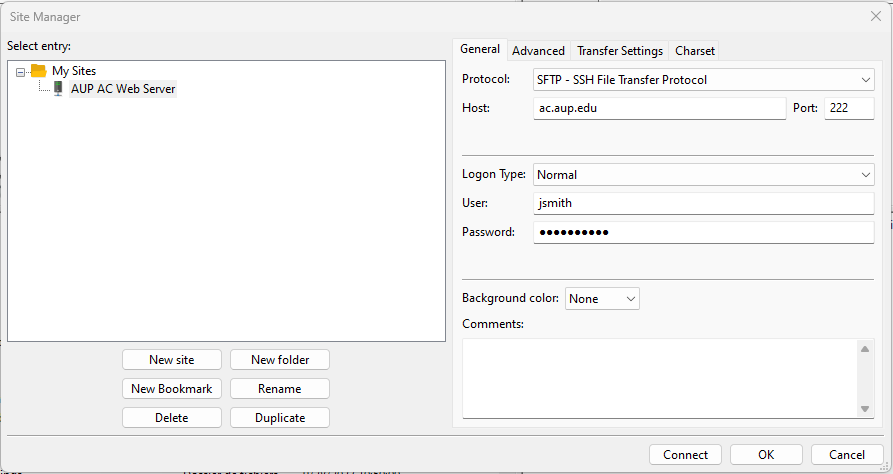
- Go to the folder on the server named with your NetID
- Create a public_html folder
- Copy your website files from your local drive (Left pane on FileZilla) to the public_html directory on the remote site (Right pane on Filezilla)
- Your website is now accessible at https://ac.aup.edu/YOUR_NETID
Access this service
Once uploaded, you can access your personal website at https://ac.aup.edu/YOUR_NETID